
I still remember the message that made my stomach drop. It was 3 a.m., and my phone buzzed with a notification from a friend: “Did you see what happened to FTX?” I opened Twitter and watched in horror as billions of dollars in customer funds evaporated overnight. People who trusted a centralized exchange with their life savings were now creditors in a bankruptcy proceeding.
I had been guilty of the same mistake. For years, I left my crypto on exchanges, telling myself it was fine. “They’re reputable,” I thought. “They have insurance.” The FTX collapse taught me—and thousands of others—a brutal lesson: if you don’t control your private keys, you don’t control your crypto.
That experience sent me down a rabbit hole of research into best crypto wallets for security. I tested hardware wallets, compared software options, talked to security experts, and made my own mistakes along the way. What I learned is that securing your crypto isn’t complicated, but it is absolutely essential.
In this guide, I’ll walk you through the best crypto wallets for security across different needs. We’ll cover hardware wallets for long-term storage, software wallets for daily use, and best practices that will keep your assets safe. Whether you’re holding a small amount or a life-changing sum, this guide will help you protect what’s yours.
Let’s dive into the world of crypto security.
Part 1: Why Crypto Wallet Security Matters
Before we get into the best crypto wallets for security, we need to understand what we’re protecting against.
The Risks
| Risk | What It Is | Real-World Example |
|---|---|---|
| Exchange collapse | Centralized exchange loses customer funds | FTX ($8 billion lost) |
| Hacking | Attackers breach exchange or wallet | Mt. Gox (850,000 BTC stolen) |
| Phishing | Fake sites trick you into giving keys | Over $500M lost annually |
| Malware | Software steals private keys | Clipboard hijackers |
| Physical theft | Someone steals your device | Phone theft with unsecured wallets |
| User error | Losing keys, sending to wrong address | Estimated 20% of Bitcoin lost forever |
The Golden Rule of Crypto Security
Not your keys, not your coins.
This phrase captures the most important principle in crypto. If your crypto is on an exchange, you don’t actually own it—you own an IOU from the exchange. If the exchange goes bankrupt, gets hacked, or freezes withdrawals, your funds may be gone.
The only way to truly own your crypto is to hold it in a wallet where you control the private keys.
Part 2: Types of Crypto Wallets
Understanding wallet types is essential for choosing the best crypto wallets for security.
Wallet Categories
| Type | Description | Security Level | Best For |
|---|---|---|---|
| Hardware Wallet | Physical device storing keys offline | Highest | Long-term storage, large amounts |
| Software Wallet | App on phone or computer | Medium | Daily use, small amounts |
| Paper Wallet | Private keys printed on paper | High (if created securely) | Cold storage, gifting |
| Exchange Wallet | Keys held by exchange | Lowest | Trading only, small amounts |
Custodial vs. Non-Custodial
| Type | Who Controls Keys | Security | Convenience |
|---|---|---|---|
| Custodial | Exchange or service | Lower (third-party risk) | Higher (password recovery) |
| Non-Custodial | You | Higher (you control) | Lower (you’re responsible) |
For true security, you want a non-custodial wallet where you control the private keys.
Part 3: The Best Hardware Wallets
Hardware wallets are the gold standard for best crypto wallets for security. They store your private keys offline, making them immune to online attacks.
#1: Ledger Nano X
Price: $149
Security Rating: ★★★★★
Overview
Ledger is the most recognized name in hardware wallets. The Nano X is their flagship model, offering Bluetooth connectivity for mobile use and support for over 5,500 cryptocurrencies.
Key Features
| Feature | Details |
|---|---|
| Secure Element | Certified CC EAL6+ chip (bank-grade security) |
| Bluetooth | Connect to iPhone and Android |
| Screen | Built-in display for transaction verification |
| Battery | Rechargeable, lasts hours |
| Capacity | Install up to 100 apps simultaneously |
| Recovery Phrase | 24-word backup |
Pros and Cons
| Pros | Cons |
|---|---|
| Industry-leading security | More expensive than competitors |
| Supports 5,500+ cryptocurrencies | Bluetooth concerns for some users |
| Great mobile experience | Battery can degrade over time |
| Sleek, portable design |
Best For
- Users who need mobile access
- Holding multiple cryptocurrencies
- Long-term storage with occasional use
#2: Ledger Nano S Plus
Price: $79
Security Rating: ★★★★★
Overview
The Nano S Plus is the budget-friendly version of Ledger’s hardware wallet. It offers the same security as the Nano X without Bluetooth or battery.
Key Features
| Feature | Details |
|---|---|
| Secure Element | Same CC EAL6+ chip as Nano X |
| Connectivity | USB-C only |
| Capacity | Install multiple apps |
| Recovery Phrase | 24-word backup |
Pros and Cons
| Pros | Cons |
|---|---|
| Same security as Nano X | No mobile connectivity |
| Much more affordable | Must be plugged into computer |
| Same coin support | Smaller screen |
| USB-C connection |
Best For
- Budget-conscious users
- Desktop-only users
- Backup hardware wallet
#3: Trezor Safe 5
Price: $169
Security Rating: ★★★★★
Overview
Trezor’s latest premium device, the Safe 5, combines their signature open-source security with a modern design and enhanced features.
Key Features
| Feature | Details |
|---|---|
| Open Source | Fully auditable software |
| Touchscreen | Intuitive interface |
| Secure Element | Enhanced security chip |
| Shamir Backup | Split recovery phrase into multiple shares |
| Coin Support | 1,000+ cryptocurrencies |
Pros and Cons
| Pros | Cons |
|---|---|
| Fully open source | More expensive than some competitors |
| Touchscreen makes transactions easier | No Bluetooth (USB only) |
| Shamir backup for advanced security | |
| Strong community and support |
Best For
- Security purists who prefer open source
- Users who want touchscreen convenience
- Those who want advanced backup options
#4: Trezor Safe 3
Price: $79
Security Rating: ★★★★★
Overview
Trezor’s entry-level device combines their signature security with a more affordable price point. This is the updated version of the original Trezor One.
Key Features
| Feature | Details |
|---|---|
| Secure Element | Enhanced security chip |
| Open Source | Fully auditable software |
| Coin Support | 1,000+ cryptocurrencies |
| Form Factor | Compact, no touchscreen |
Pros and Cons
| Pros | Cons |
|---|---|
| More affordable than Safe 5 | No touchscreen |
| Open source with secure element | Limited to USB connection |
| Highly trusted brand | |
| Compact design |
Best For
- Budget-conscious Trezor fans
- Users who don’t need touchscreen
- Backup hardware wallet
#5: Ellipal Titan
Price: $169
Security Rating: ★★★★★
Overview
Ellipal Titan takes a unique approach to security: it’s completely air-gapped, meaning it never connects to the internet, Wi-Fi, or Bluetooth. All transactions are done via QR codes.
Key Features
| Feature | Details |
|---|---|
| Air-Gapped | No network connectivity at all |
| QR Code Scanning | Transactions via camera |
| Metal Case | Durable, tamper-proof design |
| Self-Destruct | Anti-tamper mechanisms |
| Coin Support | 10,000+ cryptocurrencies |
Pros and Cons
| Pros | Cons |
|---|---|
| Fully air-gapped—maximum security | QR code transactions slower than Bluetooth/USB |
| No network attack vectors | Mobile-only (no desktop app) |
| Durable metal construction | Less established than Ledger/Trezor |
| Supports many coins |
Best For
- Maximum security purists
- Users concerned about network attacks
- Those who want truly offline storage
#6: Ledger Stax
Price: $279
Security Rating: ★★★★★
Overview
Ledger Stax is their premium, curved-screen device designed in collaboration with iPod creator Tony Fadell. It’s ID-card-sized with a magnetic locking system.
Key Features
| Feature | Details |
|---|---|
| E-Ink Screen | Curved, always-on display |
| Magnetic Locking | Stacks with other Stax devices |
| ID-Card Size | Fits in any wallet |
| Secure Element | Same CC EAL6+ chip |
| Coin Support | 5,500+ cryptocurrencies |
Pros and Cons
| Pros | Cons |
|---|---|
| Beautiful, unique design | Premium price ($279) |
| Always-on display | More features than most need |
| Magnetic stacking | |
| ID-card sized—truly portable |
Best For
- Tech enthusiasts who want the latest design
- Users who value aesthetics alongside security
- Those willing to pay a premium
Part 4: The Best Software Wallets
Software wallets are more convenient than hardware wallets but less secure. They’re best for smaller amounts and daily use.
#7: Trust Wallet
Security Rating: ★★★★☆
Platform: iOS, Android
Overview
Trust Wallet is the official wallet of Binance. It’s mobile-only, non-custodial, and supports a vast range of cryptocurrencies.
Key Features
| Feature | Details |
|---|---|
| Non-Custodial | You control your keys |
| DApp Browser | Connect to decentralized apps |
| Staking | Earn rewards on supported coins |
| Coin Support | 4.5 million+ assets |
Pros and Cons
| Pros | Cons |
|---|---|
| Free | Mobile-only |
| Huge coin support | Owned by Binance (centralization concerns) |
| Built-in DApp browser | Less secure than hardware |
| Staking built-in |
Best For
- Mobile users
- DeFi and DApp users
- Small to medium amounts
#8: MetaMask
Security Rating: ★★★★☆
Platform: Browser extension, iOS, Android
Overview
MetaMask is the most popular wallet for Ethereum and EVM-compatible chains. It’s the gateway to DeFi, NFTs, and Web3.
Key Features
| Feature | Details |
|---|---|
| Ethereum Focus | Supports all EVM chains |
| DApp Integration | Connect to thousands of apps |
| Swaps | Built-in token exchange |
| Non-Custodial | You control your keys |
Pros and Cons
| Pros | Cons |
|---|---|
| Free | Ethereum-focused (not ideal for Bitcoin) |
| Most DApps support MetaMask | Browser extension has security risks |
| Strong community | Phishing is a major concern |
| Regular updates |
Best For
- DeFi and NFT users
- Ethereum ecosystem participants
- Web3 developers
#9: Coinbase Wallet
Security Rating: ★★★★☆
Platform: iOS, Android, Browser extension
Overview
Coinbase Wallet is separate from the Coinbase exchange. It’s a non-custodial wallet that gives you full control over your keys while integrating with the Coinbase ecosystem.
Key Features
| Feature | Details |
|---|---|
| Non-Custodial | You control your keys |
| Coinbase Integration | Easy transfer between exchange and wallet |
| DApp Browser | Connect to Web3 apps |
| NFT Support | Built-in NFT gallery |
Pros and Cons
| Pros | Cons |
|---|---|
| Beginner-friendly | Owned by centralized exchange |
| Easy integration with Coinbase | Limited coin support compared to Trust Wallet |
| Good security features |
Best For
- Beginners
- Coinbase exchange users
- Those who want easy on-ramp to DeFi
Part 5: Comparison Table
| Wallet | Type | Price | Security | Air-Gapped | Best For |
|---|---|---|---|---|---|
| Ledger Nano X | Hardware | $149 | ★★★★★ | No | Mobile, multi-coin |
| Ledger Nano S Plus | Hardware | $79 | ★★★★★ | No | Budget, desktop |
| Trezor Safe 5 | Hardware | $169 | ★★★★★ | No | Open source, touchscreen |
| Trezor Safe 3 | Hardware | $79 | ★★★★★ | No | Budget, open source |
| Ellipal Titan | Hardware | $169 | ★★★★★ | Yes | Maximum security |
| Ledger Stax | Hardware | $279 | ★★★★★ | No | Premium design |
| Trust Wallet | Software | Free | ★★★★☆ | No | Mobile, DeFi |
| MetaMask | Software | Free | ★★★★☆ | No | Ethereum, Web3 |
| Coinbase Wallet | Software | Free | ★★★★☆ | No | Beginners |
Part 6: Security Best Practices
Even the best crypto wallets for security can be compromised if you don’t follow security best practices.
1. Never Share Your Recovery Phrase
| Do | Don’t |
|---|---|
| Store recovery phrase offline | Take a photo of it |
| Use metal backup (Steel, Cryptosteel) | Store it digitally |
| Split into multiple locations | Share it with anyone |
| Test recovery before storing funds | Lose it |
2. Use Hardware Wallet for Long-Term Storage
For anything you can’t afford to lose, use a hardware wallet. Software wallets are convenient but inherently less secure. The Ellipal Titan offers the highest security with its fully air-gapped design.
3. Enable 2FA & Passphrase
| Security Feature | How It Helps |
|---|---|
| 2FA (Two-Factor Authentication) | Adds second layer to exchange accounts |
| Passphrase (25th Word) | Creates hidden wallet; even if seed is compromised, funds are safe |
| PIN Code | Prevents physical access to device |
4. Verify Addresses
Always verify the receiving address on your hardware wallet screen. Malware can change addresses in your clipboard.
5. Keep Software Updated
Always update your wallet software to the latest version. Updates include security patches.
6. Buy Hardware Wallets Directly
Only buy hardware wallets from the manufacturer. Avoid third-party sellers who could tamper with the device.
Part 7: Pro Tips for Maximum Security
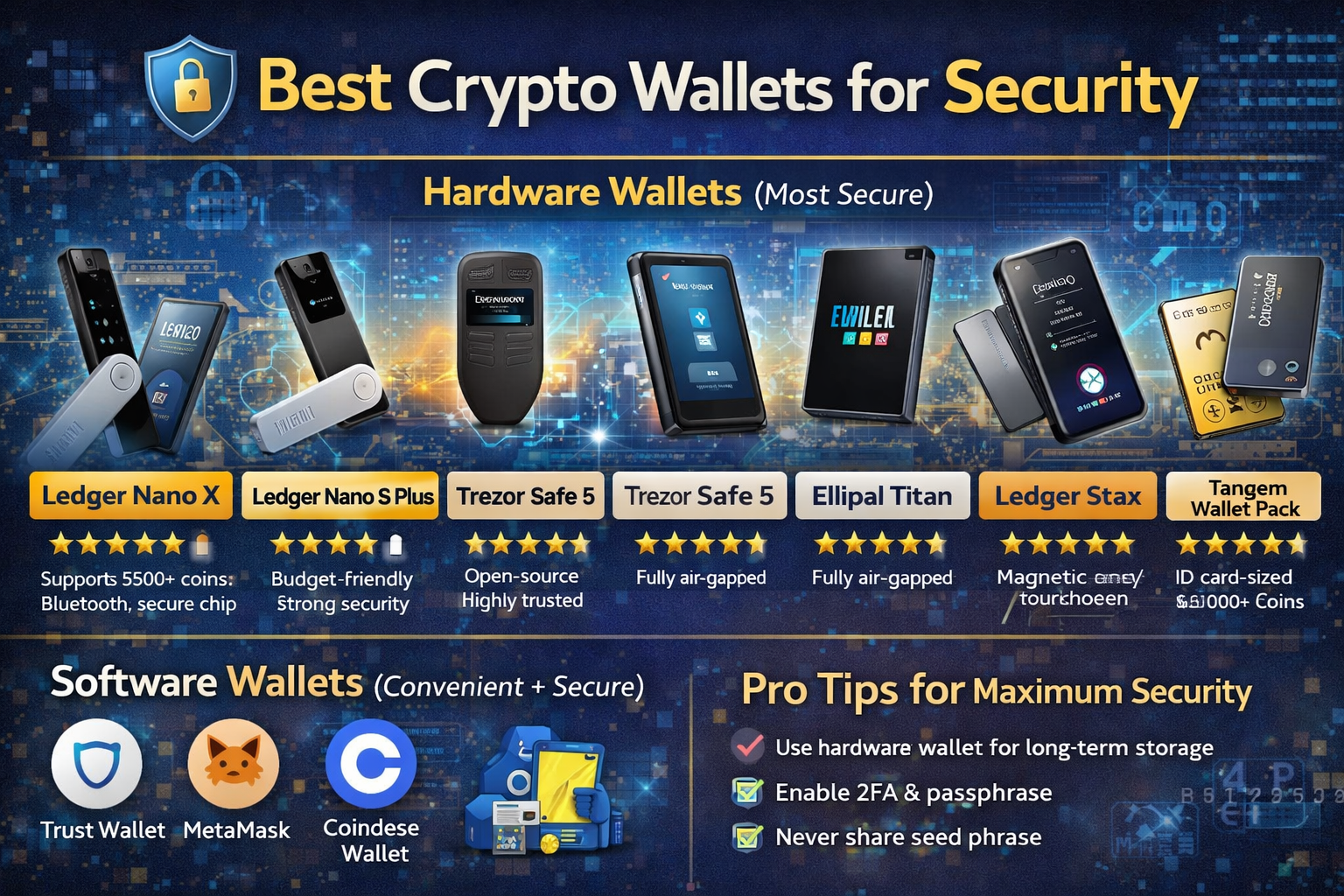
Based on the image you shared, here are the key pro tips for maximum crypto security:
| Tip | Why It Matters |
|---|---|
| ✅ Use hardware wallet for long-term storage | Hardware wallets keep private keys offline, immune to online attacks |
| ✅ Enable 2FA & passphrase | Two-factor authentication adds a second layer; passphrase creates a hidden wallet |
| ✅ Never share seed phrase | Your seed phrase is the key to your funds. Anyone with it can access your crypto |
| ✅ Use air-gapped wallets for maximum security | Devices like Ellipal Titan never connect to the internet, eliminating remote attack vectors |
| ✅ Test recovery before sending funds | Ensure you can recover before trusting large amounts |
| ✅ Keep separate wallets for different uses | One wallet for long-term storage, another for DeFi/trading |
Part 8: Common Mistakes to Avoid
| Mistake | Why It’s Dangerous | How to Avoid |
|---|---|---|
| Leaving crypto on exchanges | Exchange can freeze or lose funds | Move to self-custody wallet |
| Saving seed phrase digitally | Hacked, malware, cloud breach | Write on paper or metal |
| Falling for phishing | Fake sites steal keys | Bookmark official sites, verify URLs |
| Connecting to malicious DApps | Smart contract drains wallet | Use separate wallet for DeFi |
| Not testing recovery | You might not be able to recover | Test recovery before sending funds |
| Using same wallet for everything | One mistake loses everything | Separate wallets for different uses |
| Buying from third-party sellers | Tampered devices | Buy directly from manufacturer |
Part 9: How to Choose the Right Wallet for You
Decision Tree
text
Start
│
├─ Do you hold more than $1,000 in crypto?
│   │
│   ├─ YES → Hardware wallet
│   │   │
│   │   ├─ Want maximum security (air-gapped)? → Ellipal Titan
│   │   ├─ Want open source? → Trezor Safe 5 or Safe 3
│   │   ├─ Want mobile access? → Ledger Nano X
│   │   ├─ Want budget option? → Ledger Nano S Plus or Trezor Safe 3
│   │   └─ Want premium design? → Ledger Stax
│   │
│   └─ NO → Software wallet
│
├─ Do you primarily use Ethereum and DeFi?
│   │
│   ├─ YES → MetaMask + hardware wallet for large amounts
│   │
│   └─ NO → Continue
│
├─ Do you need mobile access?
│   │
│   ├─ YES → Trust Wallet or Coinbase Wallet
│   │
│   └─ NO → MetaMask (browser) or hardware wallet
│
└─ Are you a beginner?
    │
    ├─ YES → Coinbase Wallet or Trust Wallet
    │
    └─ NO → Hardware wallet + appropriate software wallet
Part 10: Wallet Setup Checklist
Follow this checklist when setting up any crypto wallet.
Hardware Wallet Setup
- Buy directly from manufacturer
- Inspect packaging for tampering
- Set up device in a secure location
- Generate new recovery phrase (never use pre-filled)
- Write recovery phrase on paper or metal
- Store recovery phrase in secure location
- Add a passphrase (optional, advanced)
- Test recovery before sending funds
- Install latest firmware
- Send small test transaction first
Software Wallet Setup
- Download from official source (verify URL)
- Write down recovery phrase
- Store phrase offline
- Enable two-factor authentication if available
- Set strong, unique password
- Test recovery before sending funds
- Send small test transaction first
Conclusion
Let’s bring this together.
Choosing the best crypto wallets for security isn’t about finding one perfect option—it’s about matching the right tool to your needs.
Hardware wallets like Ledger, Trezor, and Ellipal offer the highest level of security by keeping your private keys offline. The Ellipal Titan stands out with its fully air-gapped design—it never connects to the internet, Wi-Fi, or Bluetooth, eliminating remote attack vectors. Ledger Stax offers premium design with its curved e-ink screen and magnetic stacking. Trezor remains the top choice for open-source enthusiasts.
For daily use and smaller amounts, software wallets like Trust Wallet, MetaMask, and Coinbase Wallet offer convenience with reasonable security.
But remember: the wallet itself is only part of the equation. Your security habits matter just as much:
- ✅ Use hardware wallet for long-term storage
- ✅ Enable 2FA & passphrase
- ✅ Never share your seed phrase
- ✅ Test recovery before sending funds
The crypto space is full of opportunities—and risks. The people who succeed are the ones who take security seriously. They don’t leave funds on exchanges. They don’t cut corners. They invest time in learning how to protect what they’ve built.
You can be one of them.
Start with small amounts. Learn the tools. Build good habits. And never forget the golden rule: not your keys, not your coins.
Your future self will thank you.